-->

Showing posts with label Guide. Show all posts

Install Mods with Dota 2 Mod Organizer

Dota 2 mod organizer it a free tool that can create multiple mod skin become pak01_dir.vpk files rather then create one pak01_dir.vpk every times items_game.txt updated within dota 2 game itself with vpk creator. Cause Dota 2 Reborn based on scripts mostly, but still many mods that can create without it. Basically this tool use the same method that already explained in a post How Install Mods with VPK Creator. But this tool make more easier when use multiple mods files to become one.

How Install Mods with Dota 2 Mod Organizer
Step 1. Download Dota 2 Mod Organizer from: d2mo.ru (Original) or : D2MO (Mirror)

Step 2. The moment you open the program, it will automatically search update itself. Wait the update is done! It's usually take a moment cause dota 2 cosmetic items are many as much as heroes and even more.

Step 3. After the update is done! go to Mod Library (Equipment, Music, Couriers, Wards and Other) --> Choose mods files that you want and Download it.
d2mo

Step 4. Go to Mod Organizer --> Select/Check any mods files that already downloaded --> Click Install
It will set your gameinfo.gi and mods folder by name "D2MO". All dota 2 heroes items like arcana, immortal, terrain maps, music pack, announcer, cursor, courier, etc will be automatically installed. Like always support our favorite mmorpg games online in steam page dota 2 community market. Enjoy the best online games and boost your MMR !

Video Tutorial:

Source: vk.com/spsvolvo and d2mo.ru
Note: we do not own this tool, it's owned by d2mo team. This post just help people who struggle installing multiple mods.

 Dota 2 Mods 

How to Merge Script Mods

How to merge script Dota 2 Reborn mods items_game.txt with WinMerge? Actually you can edit manually with notepad++ for advanced user, but with WinMerge you can more easily copy and paste from old script to the new script one by clicking the different of both files. That's the feature of the software.
WinMerge

Cause we all know after every big update of Dota 2, the script file need to be replaced in order to make the mods still working. For example in this video, merge the old script from juggernaut - fireborn odachi and seasonal terrain - autumn mods to the new script

Download --->>> WinMerge.

Video :

Hope this video help you guys out of the common problem of missing some ambient particles effect after major update of Dota 2 Reborn.

 Dota 2 Mods 

How to Install Mods with Shady Installer

Many methods to install mods for Dota 2 Reborn. If some mods are not working properly, maybe you should try another method. One of the most used method beside Shutnik VPK Creator is Shady Installer.

How to Use Shady Installer

Step 1. Download --->> Shady Install.exe

Step 2. Extract the download (files, config.ini, Shady Install.exe) in to the following folder:
Steam > steamapps > common > dota 2 beta > game > dota
Shady Installer
Step 3. Copy all your mods (models, materials, particles, etc) and Paste to the "files" folder.
files folder

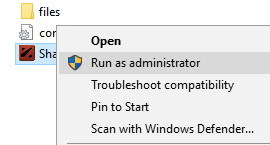
Step 4. Run as administrator "Shady Install.exe" from steam folder that you have been extracted before.
Run as Administrator

Sometimes got an error message about net framework, just click ok then.
It will be shown like this is:
Shady Install Success

Step 5. Run Dota 2 Reborn and enjoy the mods

 Dota 2 Mods 

How to Install Mods Dota 2 Reborn with VPK Creator

How to use mods for dota 2 reborn? That question always asked by many dota 2 player that really want to use mods cause no money for some expensive items. And we already posted about installing mods with other methods but valve always trying to make us can't use mods in game. In this post we're using VPK Creator. This method is the other way if dota2changer, shady intaller, etc aren't working well. Hopefully you can follow the instruction below correctly, so you can use mods in game.
This guide is provide by Shutnik.

Step 1. Create Folder

Open your dota 2 folder, go to:
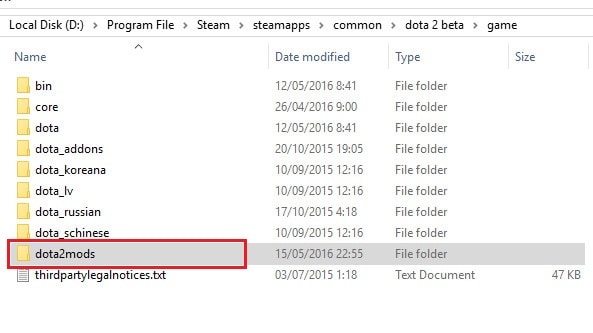
Steam > steamapps > common > dota 2 beta > game > and create new folder with any name you want. For example let me use "dota2mods" folder.
dota2mods folder

Step 2. Edit gameinfo.gi

Go to Steam > steamapps > common > dota 2 beta > game > dota > and search file with a name "gameinfo.gi" and open it with notepad++. Look carefully at red box, add with your mods folder name whatever it is.
*Note : every big update / verify cache, you should change it again. So you better keep the 2nd one in other folder.
gameinfo.gi

Step 3. Download VPK Creator and Mod

Download -->> VPK Creator and extract it.
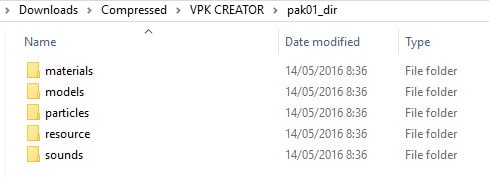
Look up the folder named "pak01_dir" > and Paste any mods (materials, models, particles, sound, etc) that you can download for sample from Sven - Arms of Rising Fury, Invoker - Dark Artistry or Shadow Fiend Arcana mod inside it.
pak01_dir

Step 4. Create pak01_dir.vpk

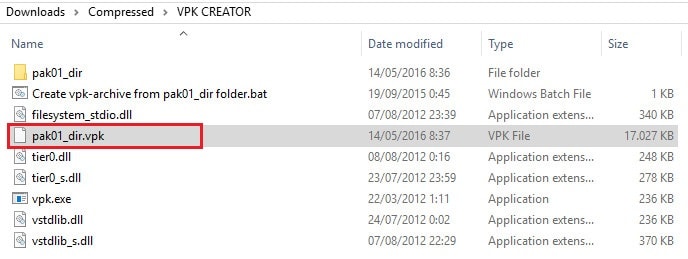
After all mods are placed in pak01_dir folder, back to VPK Creator folder and double click "Create vpk-archive from pak01_dir folder.bat". It will create pak01_dir.vpk.
pak01_dir.vpk

Step 5. Copy pak01_dir.vpk to folder

Cut or Copy "pak01_dir.vpk" to dota2mods folder that already you've created before at Step 1. Run Dota 2 Reborn and Have Fun guys.

 Dota 2 Mods 

How to Install Mods on Dota 2 Reborn

*Not Working / Old
Valve now force us to play Dota 2 with source engine 2, that is Dota 2 Reborn. Because of that mods from source engine 1 can't be used on source engine 2. Here is tutorial how to use mods on Dota 2 Reborn.
Note: Mods for source 1 can't work properly on source 2.

How to Use Mods on Dota 2 Reborn

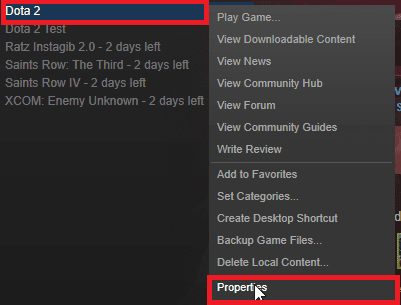
Step 1. In Library Steam --> Right click Dota 2 --> Properties
Install Mods Dota 2 Reborn

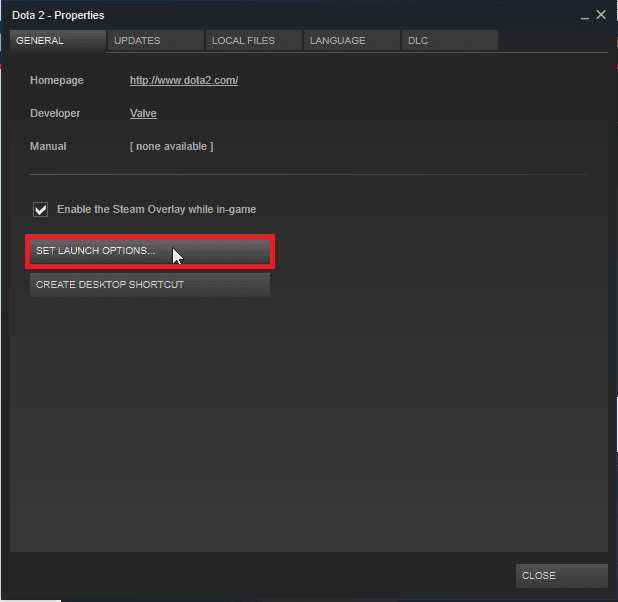
Step 2. In GENERAL Tab --> Click SET LAUNCH OPTIONS...
Install Mods Dota 2 Reborn

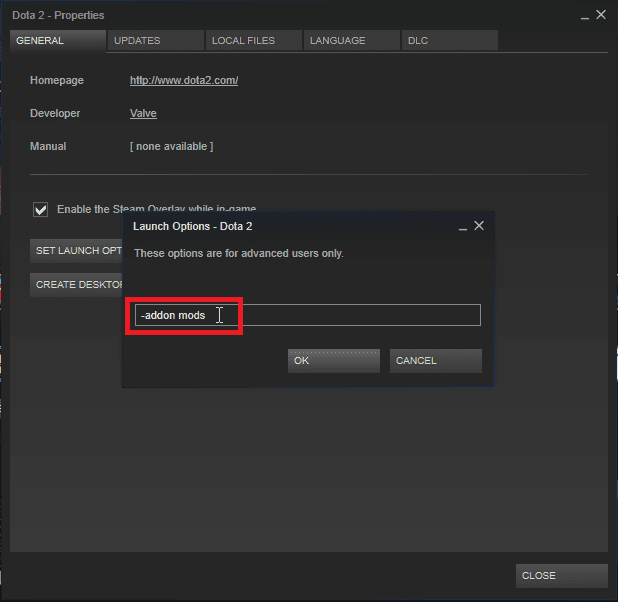
Step 3. Write command "-enable_addons" and "-addon mods" then OK
Install Mods Dota 2 Reborn

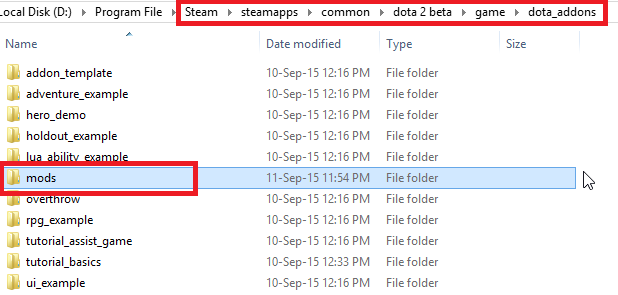
Step 4. Open folder (Steam/steamapps/common/dota 2 beta/game/dota_addons) and create new folder with name "mods"
Install Mods Dota 2 Reborn

Step 5. Paste all folders (models, particles, resource, etc) into mods folder
Install Mods Dota 2 Reborn

Step 6. Play Dota 2 Reborn and You're Welcome :)

Video


 Dota 2 Mods 

How to Install Dota 2 Mods

*Not Working / Old
Actually there are some methods to install or inject modding to Dota 2 Steam. But in this post, the method that i used is Dota2Charger. After finished the installation, you can play Dota 2 both online (pub, mmr, lobby) or offline (bot) with mods that you have been installed. Please take a note, mods just affect the client computer steam account so the others people can't see it, just you. And also it is not voilated rule of VAC (Valce Anti-Cheat). So your steam account will be safe.
dota 2 changer

How to Enable Mods

Step 1. Download --> Dota 2 Changer

Step 2. Extract to the following folder: Steam/SteamApps/common/dota 2 beta/dota

Step 3. Launch Dota 2 Changer [ENG].exe --> Click Patch Client
Note: There is a file named UpdaterEng.exe (Must be run in the folder, Steam/SteamApps/common/dota 2 beta/dota). You need to launch it every times after Dota 2 updated (*internet required). It will download some files.

Step 4. Right click Steam --> Library --> Right click Dota 2 --> Properties --> in Genereal choose Set Launch Option and write "-override_vpk" without quot --> OK

Video Installation Guide:


Thanks to Dota 2 Changer
https://vk.com/dota_2_changer

 Dota 2 Mods 
Copyright © 2015-2018 Dota 2 Mods All rights reserved.

Term of Service | Disclaimer | FAQ | About | Contact

Dota 2™ is a registered trademark of Valve Corporation ®.

This site is in no way associated with or endorsed by Valve Corporation ®

TOP